Conky não mostra temperaturas da CPU no notebook

13. Re: Conky não mostra temperaturas da CPU no notebook

Henrique
Henrique-RJ

(usa Outra)

Enviado em 31/12/2025 - 21:45h

Sistema Bodhi Linux 7 que é derivada do Ubuntu para máquinas antigas.

/home/pc/.conkyrc


-- vim: ts=4 sw=4 noet ai cindent syntax=lua
--[[
Conky, a system monitor, based on torsmo

Any original torsmo code is licensed under the BSD license

All code written since the fork of torsmo is licensed under the GPL

Please see COPYING for details

Copyright (c) 2004, Hannu Saransaari and Lauri Hakkarainen
Copyright (c) 2005-2012 Brenden Matthews, Philip Kovacs, et. al. (see AUTHORS)
All rights reserved.

This program is free software: you can redistribute it and/or modify
it under the terms of the GNU General Public License as published by
the Free Software Foundation, either version 3 of the License, or
(at your option) any later version.

This program is distributed in the hope that it will be useful,
but WITHOUT ANY WARRANTY; without even the implied warranty of
MERCHANTABILITY or FITNESS FOR A PARTICULAR PURPOSE. See the
GNU General Public License for more details.
You should have received a copy of the GNU General Public License
along with this program. If not, see <http://www.gnu.org/licenses/>.
]]

conky.config = {
alignment = false,
background = false,
border_width = 1,
cpu_avg_samples = 2,
default_color = 'white',
default_outline_color = 'white',
default_shade_color = 'white',
draw_borders = false,
draw_graph_borders = true,
draw_outline = false,
draw_shades = false,
use_xft = true,
font = 'DejaVu Sans Mono:size=8',
gap_x = 750,
gap_y = 60,
minimum_height = 5,
minimum_width = 5,
net_avg_samples = 2,
no_buffers = false,
double_buffer = true,
out_to_console = false,
out_to_stderr = false,
extra_newline = false,
own_window = true,
own_window_class = 'Conky',
own_window_type = 'desktop',
own_window_transparent = true,
own_window_argb_visual = true,
own_window_argb_value = 0,
own_window_hints = undecorated, below, sticky, skip_taskbar, skip_pager,
stippled_borders = 0,
update_interval = 1.0,
uppercase = false,
use_spacer = 'none',
show_graph_scale = false,
show_graph_range = false
}

conky.text = [[
${color white}System Monitor
$hr
Date: ${time %A - %d/%m/%Y} Time: ${time %H}:${time %M}:${time %S}
${color white}System:$color $sysname $kernel on $machine
$hr
${color white}Uptime:$color $uptime
${color white}Frequency (in GHz):$color $freq_g
${color white}CPU1 %:$color ${cpu cpu1%} ${cpubar 4}
${color white}CPU2 %:$color ${cpu cpu2%} ${cpubar 4}
${color white}RAM:${color green} $mem / $memeasyfree / $memfree / $memmax
${color white}Swap:$color $swap/ $swapmax - $swapperc% ${color yellow} ${swapbar 4} ${color white}
$hr
${color white}UPS APC BE600N-BR:
${color white}Charge: ${apcupsd localhost 3551} ${apcupsd_charge}% Load:${apcupsd_load}% ${color yellow} ${apcupsd_loadbar 4}
${color white}Inp Volt: ${apcupsd_linev}V Time Left: ${apcupsd_timeleft}min
${color white}Reason: ${apcupsd_lastxfer} ${color white}
$hr
${color green}Temperatures: Core0: ${hwmon 0 temp 2}°C Core1: ${hwmon 0 temp 3}°C HDD: ${exec hddtemp /dev/sda | awk '{print $NF}'}
${color white}Voltages: Core0:$color ${hwmon 1 vol 0} Core1: ${hwmon 1 vol 1} 3,3V: ${hwmon 1 vol 2}
${color white}5V: ${hwmon 1 vol 3} 12V: ${hwmon 1 vol 5} Vbat: ${hwmon 1 vol 8}
${color green}CPU Fan1: ${exec sensors | awk '/fan1/ { print $2 }'}rpm ChassisFan: ${exec sensors | awk '/fan2/ { print $2 }'}rpm ${color white}
#${if_existing /dev/sda} ${if_match ${execi 60 sudo smartctl -A /dev/sda | awk '/Temperature_Celsius/ {print $10}'} > 58} ${if_match ${execi 1 sh -c 'echo $(( $(date +%s) % 2 ))'} == 0} ${color red} ${else} ${color yellow} ${endif} CUIDADO - O HD ESTÁ DERRETENDO!!! ${color} ${endif} ${endif}
#${if_existing /dev/sda} ${if_match ${execi 60 sudo smartctl -A /dev/sda | awk '/Temperature_Celsius/ {print $10}'} > 58} ${if_match ${execi 1 sh -c 'echo $(( $(date +%s) % 2 ))'} == 0} ${color red} ${else} ${color yellow} ${endif} WARNING: HDD TEMPERATURE IS TOO HIGH !!! ${color} ${endif} ${endif}
${if_match ${execi 60 hddtemp /dev/sda | awk '{print $NF}' | sed 's/[+°C]//g'} > 58} ${if_match ${updates} %2 == 0} ${color yellow} ${else} ${color yellow} ${endif} WARNING - HDD TEMPERATURE IS TOO HIGH !! ${color} ${endif}
#${if_match ${execi 60 hddtemp /dev/sda | awk '{print $NF}' | sed 's/[+°C]//g'} > 30} ${if_match ${execi 1 date +%S} > 30} ${color red} ${else} ${color yellow}${endif} CUIDADO - O HD ESTÁ DERRETENDO!!! ${color} ${endif}
#${if_match ${execi 60 hddtemp /dev/sda | awk '{print $NF}' | sed 's/[^0-9]//g'} > 60} ${color yellow} WARNING - HDD TEMPERATURE IS TOO HIGH ${endif}
#${exec hddtemp /dev/sda} > 60°C ${exec yad --title Alerta --text "WARNING - HDD TEMPERATURE IS TOO HIGH"}
${color white}Networking: ${color green} Up:$color ${upspeed wlx00e0222e091a} ${color green} Down:$color ${downspeed wlx00e0222e091a}
${color white}File systems:
$color/dev/sda3: ${fs_used /} / ${fs_size /} ${color yellow} ${fs_bar 4 /}
${color white}Processes:$color $processes ${color grey}Running:$color $running_processes
${color white}Name PID CPU% MEM%
${color white}${top name 1} ${top pid 1} ${top cpu 1} ${top mem 1}
${color white}${top name 2} ${top pid 2} ${top cpu 2} ${top mem 2}
${color white}${top name 3} ${top pid 3} ${top cpu 3} ${top mem 3}
${color white}${top name 4} ${top pid 4} ${top cpu 4} ${top mem 4}
${color white}${top name 5} ${top pid 5} ${top cpu 5} ${top mem 5}
${color white}${top name 6} ${top pid 6} ${top cpu 6} ${top mem 6}
]]


____________________________________________________________________

/etc/sensors3.conf


# libsensors configuration file
# -----------------------------
#
# This default configuration file only includes statements which do not
# differ from one mainboard to the next. Only label, compute and set
# statements for internal voltage and temperature sensors are included.
#
# In general, local changes should not be added to this file, but rather
# placed in custom configuration files located in /etc/sensors.d. This
# approach makes further updates much easier.
#
# Such custom configuration files for specific mainboards can be found in
# "configs" directory of lm-sensors package.
#
# Please contribute back a configuration of your board so other users with
# the same hardware won't need to recreate it again and again.

chip "lm78-*" "lm79-*" "lm80-*" "lm96080-*"

label temp1 "M/B Temp"


chip "w83792d-*"

label in0 "VcoreA"
label in1 "VcoreB"
label in6 "+5V"
label in7 "5VSB"
label in8 "Vbat"

set in6_min 5.0 * 0.90
set in6_max 5.0 * 1.10
set in7_min 5.0 * 0.90
set in7_max 5.0 * 1.10
set in8_min 3.0 * 0.90
set in8_max 3.0 * 1.10


chip "w83793-*"

label in0 "VcoreA"
label in1 "VcoreB"
label in7 "+5V"
label in8 "5VSB"
label in9 "Vbat"

set in7_min 5.0 * 0.90
set in7_max 5.0 * 1.10
set in8_min 5.0 * 0.90
set in8_max 5.0 * 1.10
set in9_min 3.0 * 0.90
set in9_max 3.0 * 1.10


chip "w83795g-*" "w83795adg-*"

label in12 "+3.3V"
label in13 "3VSB"
label in14 "Vbat"

set in12_min 3.3 * 0.90
set in12_max 3.3 * 1.10
set in13_min 3.3 * 0.90
set in13_max 3.3 * 1.10
set in14_min 3.0 * 0.90
set in14_max 3.3 * 1.10


chip "via686a-*"

label in0 "Vcore"
label in2 "+3.3V"
label in3 "+5V"
label in4 "+12V"

set in2_min 3.3 * 0.90
set in2_max 3.3 * 1.10
set in3_min 5.0 * 0.90
set in3_max 5.0 * 1.10
set in4_min 12.0 * 0.90
set in4_max 12.0 * 1.10


chip "adm1025-*" "ne1619-*"

label in1 "Vcore"
label in2 "+3.3V"
label in3 "+5V"
label in4 "+12V"
label in5 "VCC"

set in2_min 3.3 * 0.90
set in2_max 3.3 * 1.10
set in3_min 5.0 * 0.90
set in3_max 5.0 * 1.10
set in5_min 3.3 * 0.90
set in5_max 3.3 * 1.10
# Depending on how your chip is hardwired, you may or may not have
# +12V readings.
# set in4_min 12.0 * 0.90
# set in4_max 12.0 * 1.10

label temp1 "CPU Temp"
label temp2 "M/B Temp"


chip "lm87-*" "adm1024-*"

label in1 "Vcore"
label in2 "+3.3V"
label in3 "+5V"
label in4 "+12V"

set in2_min 3.3 * 0.90
set in2_max 3.3 * 1.10
set in3_min 5.0 * 0.90
set in3_max 5.0 * 1.10
set in4_min 12.0 * 0.90
set in4_max 12.0 * 1.10

label temp1 "M/B Temp"
label temp2 "CPU Temp"

chip "it87-*" "it8712-*" "it8716-*" "it8718-*" "it8720-*"

label in5 "12V"
compute in5 @ * 3, @ / 3

label in3 "5V"
compute in3 @ * 2, @ / 2

label in8 "Vbat"


chip "fscpos-*" "fscher-*"
#FSC "Hermes"

label in0 "+12V"
label in1 "+5V"
label in2 "Vbat"

label temp1 "CPU Temp"
label temp2 "M/B Temp"
label temp3 "Aux Temp"


chip "fscscy-*"
#FSC "Scylla"

label in0 "+12V"
label in1 "+5V"
label in2 "+3.3V"

label temp1 "CPU0 Temp"
label temp2 "CPU1 Temp"
label temp3 "M/B Temp"
label temp4 "Aux Temp"


chip "fschds-*"
# Fujitsu Technology Solutions, "Hades"-Chip

# Temperatures
label temp1 "CPU Temp"
label temp2 "Super I/O Temp"
label temp3 "System Temp"

# Fans
label fan1 "PSU Fan"
label fan2 "CPU Fan"
label fan3 "System FAN2"
label fan4 "System FAN3"
label fan5 "System FAN4"

# Voltages
label in0 "+12V"
label in1 "+5V"
label in2 "Vbat"

chip "fscsyl-*"
# Fujitsu Technology Solutions, "Syleus"-Chip

# Temperatures
label temp1 "CPU Temp"
label temp4 "Super I/O Temp"
label temp5 "Northbridge Temp"

# Fans
label fan1 "CPU Fan"
label fan2 "System FAN2"
label fan3 "System FAN3"
label fan4 "System FAN4"
label fan7 "PSU Fan"

# Voltages
label in0 "+12V"
label in1 "+5V"
label in2 "Vbat"
label in3 "+3.3V"
label in5 "+3.3V-Aux"

chip "vt1211-*"

label in5 "+3.3V"

label temp2 "SIO Temp"


chip "vt8231-*"

label in5 "+3.3V"


chip "smsc47m192-*"

label in1 "Vcore"
label in2 "+3.3V"
label in3 "+5V"
label in4 "+12V"
label in5 "VCC"

set in2_min 3.3 * 0.90
set in2_max 3.3 * 1.10
set in3_min 5.0 * 0.90
set in3_max 5.0 * 1.10
set in4_min 12.0 * 0.90
set in4_max 12.0 * 1.10
set in5_min 3.3 * 0.90
set in5_max 3.3 * 1.10

label temp1 "SIO Temp"


chip "lm85-*" "lm85b-*" "lm85c-*" "adm1027-*" "adt7463-*" "adt7468-*" \
"emc6d100-*" "emc6d102-*" "emc6d103-*" "emc6d103s-*"

label in1 "Vcore"
label in2 "+3.3V"
label in3 "+5V"
label in4 "+12V"

set in2_min 3.3 * 0.90
set in2_max 3.3 * 1.10
set in3_min 5.0 * 0.90
set in3_max 5.0 * 1.10
# Depending on how your chip is hardwired, you may or may not have
# +12V readings.
# set in4_min 12.0 * 0.90
# set in4_max 12.0 * 1.10

label temp2 "M/B Temp"


chip "emc6w201-*"

label in2 "+3.3V"
label in3 "+5V"

label temp6 "M/B Temp"


chip "pc87365-*" "pc87366-*"

# Voltage inputs

label in7 "3VSB"
label in8 "VDD"
label in9 "Vbat"
label in10 "AVDD"

compute in7 @*2, @/2
compute in8 @*2, @/2
compute in10 @*2, @/2

# These are the operating conditions as recommended by National
# Semiconductor
set in7_min 3.0
set in7_max 3.6
set in8_min 3.0
set in8_max 3.6
set in10_min 3.0
set in10_max 3.6
# Depending on the hardware setup, the battery voltage may or may not
# be monitored.
# set in9_min 2.4
# set in9_max 3.6

label temp3 "SIO Temp"

set temp3_min 0
set temp3_max 70
set temp3_crit 85


chip "adm1030-*" "adm1031-*"

label temp1 "M/B Temp"


chip "w83627thf-*"

label in3 "+5V"
label in7 "5VSB"
label in8 "Vbat"

# Internal resistors
compute in3 @ * (1 + 34/51), @ / (1 + 34/51)
compute in7 @ * (1 + 34/51), @ / (1 + 34/51)

set in3_min 5.0 * 0.90
set in3_max 5.0 * 1.10
set in7_min 5.0 * 0.90
set in7_max 5.0 * 1.10
# The battery voltage may or may not be monitored.
# set in8_min 3.0 * 0.90
# set in8_max 3.0 * 1.10


chip "w83627ehf-*" "w83627dhg-*" "w83667hg-*" "nct6775-*" "nct6776-*" \
"nct6779-*" "nct6791-*" "nct6795-*" "nct6796-*"

label in0 "Vcore"
label in2 "AVCC"
label in3 "+3.3V"
label in7 "3VSB"
label in8 "Vbat"

set in2_min 3.3 * 0.90
set in2_max 3.3 * 1.10
set in3_min 3.3 * 0.90
set in3_max 3.3 * 1.10
set in7_min 3.3 * 0.90
set in7_max 3.3 * 1.10
set in8_min 3.0 * 0.90
set in8_max 3.3 * 1.10


chip "w83627uhg-*"

label in2 "AVCC"
label in3 "+5V"
label in7 "5VSB"
label in8 "Vbat"

set in2_min 5.0 * 0.90
set in2_max 5.0 * 1.10
set in3_min 5.0 * 0.90
set in3_max 5.0 * 1.10
set in7_min 5.0 * 0.90
set in7_max 5.0 * 1.10
set in8_min 3.0 * 0.90
set in8_max 3.3 * 1.10


chip "f71805f-*"

label in0 "+3.3V"

set in0_min 3.3 * 0.90
set in0_max 3.3 * 1.10


chip "f71872f-*"

label in0 "+3.3V"
label in9 "Vbat"
label in10 "3VSB"

set in0_min 3.3 * 0.90
set in0_max 3.3 * 1.10
set in9_min 3.0 * 0.90
set in9_max 3.0 * 1.10
set in10_min 3.3 * 0.90
set in10_max 3.3 * 1.10


chip "k8temp-*"

label temp1 "Core0 Temp"
label temp2 "Core0 Temp"
label temp3 "Core1 Temp"
label temp4 "Core1 Temp"


chip "dme1737-*"

label in0 "5VSB"
label in1 "Vcore"
label in2 "+3.3V"
label in3 "+5V"
label in4 "+12V"
label in5 "3VSB"
label in6 "Vbat"

label temp2 "SIO Temp"

set in0_min 5.0 * 0.90
set in0_max 5.0 * 1.10
set in2_min 3.3 * 0.90
set in2_max 3.3 * 1.10
set in3_min 5.0 * 0.90
set in3_max 5.0 * 1.10
set in4_min 12.0 * 0.90
set in4_max 12.0 * 1.10
set in5_min 3.3 * 0.90
set in5_max 3.3 * 1.10
set in6_min 3.0 * 0.90
set in6_max 3.0 * 1.10


chip "sch311x-*"

label in1 "Vcore"
label in2 "+3.3V"
label in3 "+5V"
label in4 "+12V"
label in5 "3VSB"
label in6 "Vbat"

label temp2 "SIO Temp"

set in2_min 3.3 * 0.90
set in2_max 3.3 * 1.10
set in3_min 5.0 * 0.90
set in3_max 5.0 * 1.10
set in4_min 12.0 * 0.90
set in4_max 12.0 * 1.10
set in5_min 3.3 * 0.90
set in5_max 3.3 * 1.10
set in6_min 3.0 * 0.90
set in6_max 3.0 * 1.10


chip "sch5027-*"

label in0 "5VSB"
label in1 "Vcore"
label in2 "+3.3V"
label in5 "3VSB"
label in6 "Vbat"

label temp2 "SIO Temp"

set in0_min 5.0 * 0.90
set in0_max 5.0 * 1.10
set in2_min 3.3 * 0.90
set in2_max 3.3 * 1.10
set in5_min 3.3 * 0.90
set in5_max 3.3 * 1.10
set in6_min 3.0 * 0.90
set in6_max 3.0 * 1.10


chip "sch5127-*"

label in2 "+3.3V"
label in5 "3VSB"
label in6 "Vbat"

set in2_min 3.3 * 0.90
set in2_max 3.3 * 1.10
set in5_min 3.3 * 0.90
set in5_max 3.3 * 1.10
set in6_min 3.0 * 0.90
set in6_max 3.0 * 1.10


chip "f71808e-*" "f71808a-*" "f71862fg-*" "f71869-*" "f71869a-*" "f71882fg-*" \
"f71889fg-*" "f71889ed-*" "f71889a-*"

label in0 "+3.3V"
label in7 "3VSB"
label in8 "Vbat"

compute in0 @*2, @/2
compute in7 @*2, @/2
compute in8 @*2, @/2


chip "f71858fg-*" "f8000-*"

label in0 "+3.3V"
label in1 "3VSB"
label in2 "Vbat"

compute in0 @*2, @/2
compute in1 @*2, @/2
compute in2 @*2, @/2


chip "f71868a-*"

label in0 "+3.3V"
label in7 "3VSB"
label in8 "Vbat"
label in9 "5VSB"

compute in0 @*2, @/2
compute in7 @*2, @/2
compute in8 @*2, @/2
compute in9 @*3, @/3


chip "f81865f-*"

label in0 "+3.3V"
label in5 "3VSB"
label in6 "Vbat"

compute in0 @*2, @/2
compute in5 @*2, @/2
compute in6 @*2, @/2


chip "adt7473-*" "adt7475-*"

label in2 "+3.3V"

set in2_min 3.3 * 0.90
set in2_max 3.3 * 1.10

label temp2 "Board Temp"


chip "adt7476-*" "adt7490-*"

label in1 "Vcore"
label in2 "+3.3V"
label in3 "+5V"
label in4 "+12V"

set in2_min 3.3 * 0.90
set in2_max 3.3 * 1.10
set in3_min 5.0 * 0.90
set in3_max 5.0 * 1.10
# Depending on how your ADT7476 is hardwired, you may or may not have
# +12V readings.
# set in4_min 12.0 * 0.90
# set in4_max 12.0 * 1.10

label temp2 "M/B Temp"


_______________________________________________________
E viu-se um grande sinal no céu: uma mulher vestida de sol, tendo a lua debaixo dos seus pés, e uma coroa de doze estrelas sobre a sua cabeça. Apocalipse 12:1 Nsa Sra de Fátima, Nsa Sra de Lourdes, Nsa Sra das Graças ...
_______________________________________________________
São Padre Pio de Pietrelcina, Santa Faustina Kowalska, São Francisco de Assis e Santa Gema Galgani foram alguns dos que tiveram os milagres dos Estigmas de Cristo em seus corpos, Ferimentos que sangravam
_______________________________________________________
Milagre Eucarístico que ocorreu em uma Igreja de Lanciano na Itália no ano de 750 em que o vinho se tornou sangue e o pão carne humana estão até hoje em seus estados naturais. https://pt.wikipedia.org/wiki/Milagre_eucar%C3%ADstico_de_Lanciano
_______________________________________________________
A Luz veio ao mundo mas o mundo amou mais as trevas do que a Luz ( João 3, 19-20 )


14. Re: Conky não mostra temperaturas da CPU no notebook

Buckminster
Buckminster

(usa Debian)

Enviado em 31/12/2025 - 22:52h

Esse teu .conkyrc funcionou aqui no Debian 13, mas ajustei somente o pisca-pisca e testei com temperaturas acima de 30 e acima de 50, funcionou com as duas, primeiro deu o aviso piscando e depois não.
Verifique se você tem o smartctl instalado, use ele ao invés do hddtemp.
Sobre as voltagens ainda não ajustei, até porque é específico da tua máquina.
Mas pelo que vi das voltagens você continua usando hwmon 0 e hwmon 1 (${color white}5V: ${hwmon 1 vol 3} 12V: ${hwmon 1 vol 5} Vbat: ${hwmon 1 vol 8}) e já foi dito que isso não funciona, releia o tópico. Tem de colocar hwmon coretemp ou hwmon Core 0 e hwmon Core 1.

https://imgur.com/a/rPsQ9Nn

-- vim: ts=4 sw=4 noet ai cindent syntax=lua
--[[
Conky, a system monitor, based on torsmo

Any original torsmo code is licensed under the BSD license

All code written since the fork of torsmo is licensed under the GPL

Please see COPYING for details

Copyright (c) 2004, Hannu Saransaari and Lauri Hakkarainen
Copyright (c) 2005-2012 Brenden Matthews, Philip Kovacs, et. al. (see AUTHORS)
All rights reserved.

This program is free software: you can redistribute it and/or modify
it under the terms of the GNU General Public License as published by
the Free Software Foundation, either version 3 of the License, or
(at your option) any later version.

This program is distributed in the hope that it will be useful,
but WITHOUT ANY WARRANTY; without even the implied warranty of
MERCHANTABILITY or FITNESS FOR A PARTICULAR PURPOSE. See the
GNU General Public License for more details.
You should have received a copy of the GNU General Public License
along with this program. If not, see <http://www.gnu.org/licenses/>.
]]

conky.config = {
alignment = false,
background = false,
border_width = 1,
cpu_avg_samples = 2,
default_color = 'white',
default_outline_color = 'white',
default_shade_color = 'white',
draw_borders = false,
draw_graph_borders = true,
draw_outline = false,
draw_shades = false,
use_xft = true,
font = 'DejaVu Sans Mono:size=8',
gap_x = 750,
gap_y = 60,
minimum_height = 5,
minimum_width = 5,
net_avg_samples = 2,
no_buffers = false,
double_buffer = true,
out_to_console = false,
out_to_stderr = false,
extra_newline = false,
own_window = true,
own_window_class = 'Conky',
own_window_type = 'desktop',
own_window_transparent = true,
own_window_argb_visual = true,
own_window_argb_value = 0,
own_window_hints = undecorated, below, sticky, skip_taskbar, skip_pager,
stippled_borders = 0,
update_interval = 1.0,
uppercase = false,
use_spacer = 'none',
show_graph_scale = false,
show_graph_range = false
}

conky.text = [[
${color white}System Monitor
$hr
Date: ${time %A - %d/%m/%Y} Time: ${time %H}:${time %M}:${time %S}
${color white}System:$color $sysname $kernel on $machine
$hr
${color white}Uptime:$color $uptime
${color white}Frequency (in GHz):$color $freq_g
${color white}CPU1 %:$color ${cpu cpu1%} ${cpubar 4}
${color white}CPU2 %:$color ${cpu cpu2%} ${cpubar 4}
${color white}RAM:${color green} $mem / $memeasyfree / $memfree / $memmax
${color white}Swap:$color $swap/ $swapmax - $swapperc% ${color yellow} ${swapbar 4} ${color white}
$hr
${color white}UPS APC BE600N-BR:
${color white}Charge: ${apcupsd localhost 3551} ${apcupsd_charge}% Load:${apcupsd_load}% ${color yellow} ${apcupsd_loadbar 4}
${color white}Inp Volt: ${apcupsd_linev}V Time Left: ${apcupsd_timeleft}min
${color white}Reason: ${apcupsd_lastxfer} ${color white}
$hr
${color green}Temperatures: Core0: ${hwmon 0 temp 2}°C Core1: ${hwmon 0 temp 3}°C HDD: ${execi smartctl -A /dev/sda | awk '{print $NF}'}
${color white}Voltages: Core0:$color ${hwmon 1 vol 0} Core1: ${hwmon 1 vol 1} 3,3V: ${hwmon 1 vol 2}
${color white}5V: ${hwmon 1 vol 3} 12V: ${hwmon 1 vol 5} Vbat: ${hwmon 1 vol 8}
${color green}CPU Fan1: ${exec sensors | awk '/fan1/ { print $2 }'}rpm ChassisFan: ${exec sensors | awk '/fan2/ { print $2 }'}rpm ${color white}
${if_existing /dev/sda}
${if_match ${execi 60 sudo smartctl -A /dev/sda | awk '/Temperature_Celsius/ {print $10}'} > 52}
${if_match ${execi 1 sh -c 'echo $(( $(date +%s) % 2 ))'} == 0}
${color red}
${else}
${color yellow}
${endif}
CUIDADO - O HD ESTÁ DERRETENDO!!!
${color}
${endif}
${endif}

#${if_existing /dev/sda} ${if_match ${execi 60 sudo smartctl -A /dev/sda | awk '/Temperature_Celsius/ {print $10}'} > 30} ${if_match ${execi 1 sh -c 'echo $(( $(date +%s) % 2 ))'} == 0} ${color red} ${else} ${color yellow} ${endif} CUIDADO - O HD ESTÁ DERRETENDO!!! ${color} ${endif} ${endif}
#${if_existing /dev/sda} ${if_match ${execi 60 sudo smartctl -A /dev/sda | awk '/Temperature_Celsius/ {print $10}'} > 58} ${if_match ${execi 1 sh -c 'echo $(( $(date +%s) % 2 ))'} == 0} ${color red} ${else} ${color yellow} ${endif} WARNING: HDD TEMPERATURE IS TOO HIGH !!! ${color} ${endif} ${endif}
#${if_match ${execi 60 hddtemp /dev/sda | awk '{print $NF}' | sed 's/[+°C]//g'} > 58} ${if_match ${updates} %2 == 0} ${color yellow} ${else} ${color yellow} ${endif} WARNING - HDD TEMPERATURE IS TOO HIGH !! ${color} ${endif}
#${if_match ${execi 60 hddtemp /dev/sda | awk '{print $NF}' | sed 's/[+°C]//g'} > 30} ${if_match ${execi 1 date +%S} > 30} ${color red} ${else} ${color yellow}${endif} CUIDADO - O HD ESTÁ DERRETENDO!!! ${color} ${endif}
#${if_match ${execi 60 hddtemp /dev/sda | awk '{print $NF}' | sed 's/[^0-9]//g'} > 60} ${color yellow} WARNING - HDD TEMPERATURE IS TOO HIGH ${endif}
#${exec hddtemp /dev/sda} > 60°C ${exec yad --title Alerta --text "WARNING - HDD TEMPERATURE IS TOO HIGH"}
${color white}Networking: ${color green} Up:$color ${upspeed wlx00e0222e091a} ${color green} Down:$color ${downspeed wlx00e0222e091a}
${color white}File systems:
$color/dev/sda3: ${fs_used /} / ${fs_size /} ${color yellow} ${fs_bar 4 /}
${color white}Processes:$color $processes ${color grey}Running:$color $running_processes
${color white}Name PID CPU% MEM%
${color white}${top name 1} ${top pid 1} ${top cpu 1} ${top mem 1}
${color white}${top name 2} ${top pid 2} ${top cpu 2} ${top mem 2}
${color white}${top name 3} ${top pid 3} ${top cpu 3} ${top mem 3}
${color white}${top name 4} ${top pid 4} ${top cpu 4} ${top mem 4}
${color white}${top name 5} ${top pid 5} ${top cpu 5} ${top mem 5}
${color white}${top name 6} ${top pid 6} ${top cpu 6} ${top mem 6}
]]


_________________________________________________________
Rule number one: Always listen 'to' Buck!
Enquanto o cursor estiver pulsando, há vida!


15. Re: Conky não mostra temperaturas da CPU no notebook

Henrique
Henrique-RJ

(usa Outra)

Enviado em 31/12/2025 - 23:24h

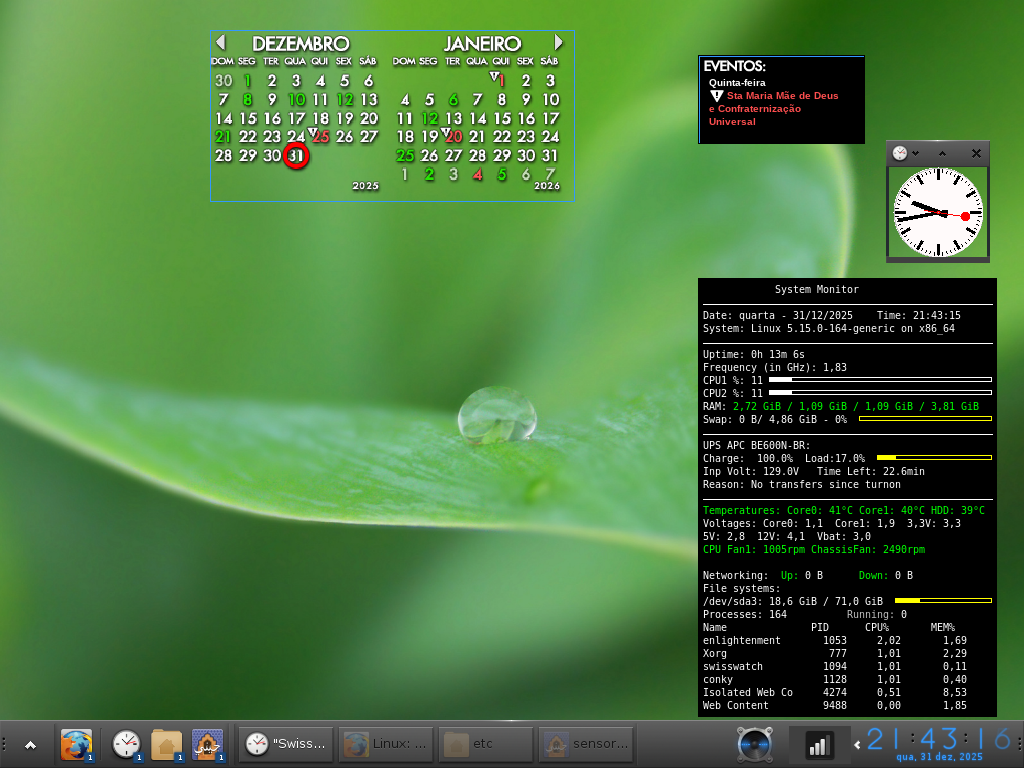
Aqui tenho o smartctl instalado sim mas essa linha de código no .conkyrc faz a mensagem de alerta ficar piscando o tempo todo com qualquer temperatura que eu ponha de limite. Achei melhor ficar do jeito que está isto é, sem pisca pisca, aparecendo a mensagem só se o limite for atingido o que já vai me chamar a atenção pois é uma mensagem com letras grandes e em amarelo contrastando com o fundo preto do conky.

Concluindo todo esse trabalho vou tratar de salvar em pendrive esse .conkyrc como backup para caso venha precisar futuramente. Toda essa configuração eu fui desenvolvendo aos poucos ao longo dos anos, sempre salvando em pendrive as mudanças. Por isso que esse meu conky está assim todo bonito e complexo deixando aqui para a comunidade disponível com os prints para quem quiser usar também.


_______________________________________________________
E viu-se um grande sinal no céu: uma mulher vestida de sol, tendo a lua debaixo dos seus pés, e uma coroa de doze estrelas sobre a sua cabeça. Apocalipse 12:1 Nsa Sra de Fátima, Nsa Sra de Lourdes, Nsa Sra das Graças ...
_______________________________________________________
São Padre Pio de Pietrelcina, Santa Faustina Kowalska, São Francisco de Assis e Santa Gema Galgani foram alguns dos que tiveram os milagres dos Estigmas de Cristo em seus corpos, Ferimentos que sangravam
_______________________________________________________
Milagre Eucarístico que ocorreu em uma Igreja de Lanciano na Itália no ano de 750 em que o vinho se tornou sangue e o pão carne humana estão até hoje em seus estados naturais. https://pt.wikipedia.org/wiki/Milagre_eucar%C3%ADstico_de_Lanciano
_______________________________________________________
A Luz veio ao mundo mas o mundo amou mais as trevas do que a Luz ( João 3, 19-20 )


16. Re: Conky não mostra temperaturas da CPU no notebook

Henrique
Henrique-RJ

(usa Outra)

Enviado em 02/01/2026 - 01:38h

Encontrei, no fórum do link abaixo, uma linha de comandos que resolveu a questão das tensões erradas de 5V e de 12V no conky que não batiam com as do sensors:

https://www.linux.org/threads/need-help-getting-conky-to-correctly-display-my-vcore-solved.35888/

O arquivo de configurações do conky ( .conkyrc ) ficou desse jeito a seguir:


-- vim: ts=4 sw=4 noet ai cindent syntax=lua
--[[
Conky, a system monitor, based on torsmo

Any original torsmo code is licensed under the BSD license

All code written since the fork of torsmo is licensed under the GPL

Please see COPYING for details

Copyright (c) 2004, Hannu Saransaari and Lauri Hakkarainen
Copyright (c) 2005-2012 Brenden Matthews, Philip Kovacs, et. al. (see AUTHORS)
All rights reserved.

This program is free software: you can redistribute it and/or modify
it under the terms of the GNU General Public License as published by
the Free Software Foundation, either version 3 of the License, or
(at your option) any later version.

This program is distributed in the hope that it will be useful,
but WITHOUT ANY WARRANTY; without even the implied warranty of
MERCHANTABILITY or FITNESS FOR A PARTICULAR PURPOSE. See the
GNU General Public License for more details.
You should have received a copy of the GNU General Public License
along with this program. If not, see <http://www.gnu.org/licenses/>.
]]

conky.config = {
alignment = false,
background = false,
border_width = 1,
cpu_avg_samples = 2,
default_color = 'white',
default_outline_color = 'white',
default_shade_color = 'white',
draw_borders = false,
draw_graph_borders = true,
draw_outline = false,
draw_shades = false,
use_xft = true,
font = 'DejaVu Sans Mono:size=8',
gap_x = 750,
gap_y = 60,
minimum_height = 5,
minimum_width = 5,
net_avg_samples = 2,
no_buffers = false,
double_buffer = true,
out_to_console = false,
out_to_stderr = false,
extra_newline = false,
own_window = true,
own_window_class = 'Conky',
own_window_type = 'desktop',
own_window_transparent = true,
own_window_argb_visual = true,
own_window_argb_value = 0,
own_window_hints = undecorated, below, sticky, skip_taskbar, skip_pager,
stippled_borders = 0,
update_interval = 1.0,
uppercase = false,
use_spacer = 'none',
show_graph_scale = false,
show_graph_range = false
}

conky.text = [[
${color white}System Monitor
$hr
Date: ${time %A - %d/%m/%Y} Time: ${time %H}:${time %M}:${time %S}
${color white}System:$color $sysname $kernel on $machine
$hr
${color white}Uptime:$color $uptime
${color white}Frequency (in GHz):$color $freq_g
${color white}CPU1 %:$color ${cpu cpu1%} ${cpubar 4}
${color white}CPU2 %:$color ${cpu cpu2%} ${cpubar 4}
${color white}RAM:${color green} $mem / $memeasyfree / $memfree / $memmax
${color white}Swap:$color $swap/ $swapmax - $swapperc% ${color yellow} ${swapbar 4} ${color white}
$hr
${color white}UPS APC BE600N-BR:
${color white}Charge: ${apcupsd localhost 3551} ${apcupsd_charge}% Load:${apcupsd_load}% ${color yellow} ${apcupsd_loadbar 4}
${color white}Inp Volt: ${apcupsd_linev}V Time Left: ${apcupsd_timeleft}min
${color white}Reason: ${apcupsd_lastxfer} ${color white}
$hr
${color green}Temperatures: Core0: ${hwmon 0 temp 2}°C Core1: ${hwmon 0 temp 3}°C HDD: ${exec hddtemp /dev/sda | awk '{print $NF}'}
${color white}Voltages: Core0:$color ${hwmon 1 vol 0} Core1: ${hwmon 1 vol 1} 3,3V: ${hwmon 1 vol 2}
${color white}5V: ${execi 2 sensors -u | grep -w 'in3_input' | cut -c 14-32} 12V: ${execi 2 sensors -u | grep -w 'in5_input' | cut -c 14-32} Vbat: ${hwmon 1 vol 8}
${color green}CPU Fan1: ${exec sensors | awk '/fan1/ { print $2 }'}rpm ChassisFan: ${exec sensors | awk '/fan2/ { print $2 }'}rpm ${color white}
${if_existing /dev/sda}
#${if_existing /dev/sda} ${if_match ${execi 60 sudo smartctl -A /dev/sda | awk '/Temperature_Celsius/ {print $10}'} > 58} ${if_match ${execi 1 sh -c 'echo $(( $(date +%s) % 2 ))'} == 0} ${color red} ${else} ${color yellow} ${endif} WARNING: HDD TEMPERATURE IS TOO HIGH !!! ${color} ${endif} ${endif}
${if_match ${execi 60 hddtemp /dev/sda | awk '{print $NF}' | sed 's/[+°C]//g'} > 58} ${if_match ${updates} %2 == 0} ${color yellow} ${else} ${color yellow} ${endif} WARNING - HDD TEMPERATURE IS TOO HIGH !! ${color} ${endif}
#${if_match ${execi 60 hddtemp /dev/sda | awk '{print $NF}' | sed 's/[+°C]//g'} > 30} ${if_match ${execi 1 date +%S} > 30} ${color red} ${else} ${color yellow}${endif} CUIDADO - O HD ESTÁ DERRETENDO!!! ${color} ${endif}
#${if_match ${execi 60 hddtemp /dev/sda | awk '{print $NF}' | sed 's/[^0-9]//g'} > 60} ${color yellow} WARNING - HDD TEMPERATURE IS TOO HIGH ${endif}
#${exec hddtemp /dev/sda} > 60°C ${exec yad --title Alerta --text "WARNING - HDD TEMPERATURE IS TOO HIGH"}
${color white}Networking: ${color green} Up:$color ${upspeed wlx00e0222e091a} ${color green} Down:$color ${downspeed wlx00e0222e091a}
${color white}File systems:
$color/dev/sda3: ${fs_used /} / ${fs_size /} ${color yellow} ${fs_bar 4 /}
${color white}Processes:$color $processes ${color grey}Running:$color $running_processes
${color white}Name PID CPU% MEM%
${color white}${top name 1} ${top pid 1} ${top cpu 1} ${top mem 1}
${color white}${top name 2} ${top pid 2} ${top cpu 2} ${top mem 2}
${color white}${top name 3} ${top pid 3} ${top cpu 3} ${top mem 3}
${color white}${top name 4} ${top pid 4} ${top cpu 4} ${top mem 4}
${color white}${top name 5} ${top pid 5} ${top cpu 5} ${top mem 5}
${color white}${top name 6} ${top pid 6} ${top cpu 6} ${top mem 6}
]]


As tensões de 5V e de 12V no conky agora passaram a ter 3 casas decimais sem necessidade, penso eu, mas não consegui diminuir para uma apenas.

Ficou show !!


_______________________________________________________
E viu-se um grande sinal no céu: uma mulher vestida de sol, tendo a lua debaixo dos seus pés, e uma coroa de doze estrelas sobre a sua cabeça. Apocalipse 12:1 Nsa Sra de Fátima, Nsa Sra de Lourdes, Nsa Sra das Graças ...
_______________________________________________________
São Padre Pio de Pietrelcina, Santa Faustina Kowalska, São Francisco de Assis e Santa Gema Galgani foram alguns dos que tiveram os milagres dos Estigmas de Cristo em seus corpos, Ferimentos que sangravam
_______________________________________________________
Milagre Eucarístico que ocorreu em uma Igreja de Lanciano na Itália no ano de 750 em que o vinho se tornou sangue e o pão carne humana estão até hoje em seus estados naturais. https://pt.wikipedia.org/wiki/Milagre_eucar%C3%ADstico_de_Lanciano
_______________________________________________________
A Luz veio ao mundo mas o mundo amou mais as trevas do que a Luz ( João 3, 19-20 )


17. Re: Conky não mostra temperaturas da CPU no notebook

Henrique
Henrique-RJ

(usa Outra)

Enviado em 03/01/2026 - 02:33h

Aferi as tensões com multímetro e estão bem diferentes do que mostra no sensors/conky. Elas estão bem próximas dos limites mínimos talvez por se tratar de fonte com muitos anos de uso ( uma IceAge de 500w ).

Se no conky as de 3.3v e de 5v ficarem menores em 0,1v o limite mínimo real deverá ser ultrapassado podendo trazer problema ao funcionamento do PC acredito eu. Na de 12v precisa diminuir 0,8v para ficar fora do normal.

Ainda vou ter que trocar os capacitores desta fonte que devem estar quase esgotados ...

_______________________________________________________
E viu-se um grande sinal no céu: uma mulher vestida de sol, tendo a lua debaixo dos seus pés, e uma coroa de doze estrelas sobre a sua cabeça. Apocalipse 12:1 Nsa Sra de Fátima, Nsa Sra de Lourdes, Nsa Sra das Graças ...
_______________________________________________________
São Padre Pio de Pietrelcina, Santa Faustina Kowalska, São Francisco de Assis e Santa Gema Galgani foram alguns dos que tiveram os milagres dos Estigmas de Cristo em seus corpos, Ferimentos que sangravam
_______________________________________________________
Milagre Eucarístico que ocorreu em uma Igreja de Lanciano na Itália no ano de 750 em que o vinho se tornou sangue e o pão carne humana estão até hoje em seus estados naturais. https://pt.wikipedia.org/wiki/Milagre_eucar%C3%ADstico_de_Lanciano
_______________________________________________________
A Luz veio ao mundo mas o mundo amou mais as trevas do que a Luz ( João 3, 19-20 )


01 02


Patrocínio

Site hospedado pelo provedor RedeHost.
Linux banner

Destaques

Artigos

Dicas

Tópicos

Top 10 do mês

Scripts
