
Afrescalhando o Slackware
Veja como configurar um ambiente minimalista e estiloso no Slackware desde a pós-instalação do sistema.
[ Hits: 14.959 ]
Por: Xerxes em 01/02/2019

Esquema de Cores do Terminal e Papel de Parede
Essa "mágica" é feita pelo pywal.
Para instalar o pywal certifique-se de ter as dependência: python3, feh e imagemagick. Python3 e imagemagick vem na instalação Full. Basta instalar o feh.
# slpkg -s sbo feh
Depois instale o pywal:
# pip3 install pywal
Baixe um papel de parede de sua preferência. Para este artigo usarei o Corporate Sunrise:
cd ~; mkdir wall; cd wall
wget http://static.simpledesktops.com/uploads/desktops/2015/02/26/Corporate_Sunrise.png
Agora execute:
wal -i ~/wall/Corporate_Sunrise.png
Veja o resultado:

Para que o comando seja executado sempre que o i3 iniciar, coloque-o no arquivo de configuração do i3, logo após o comando anterior (do compton). Ficará assim:
##################
#INICIADOS COM O I3
##################

#Compton
exec --no-startup-id compton -cCGfF -o 0.38 -O 200 -I 200 -t 0 -l 0 -r 3 -D2 -m 0.88

#Papel de parede
exec --no-startup-id wal -i ~/wall/Corporate_Sunrise.png
#exec --no-startup-id feh --bg-fill ~/wall/Corporate_Sunrise.png
Obs.: o comando feh, acima, é uma opção para usar papel de parede sem alterar as cores do terminal. Para isso basta descomentar a linha do feh e comentar a linha do wal.
Execute este comando (apenas uma vez) para que o .bashrc lembre das cores sempre que abrir um novo terminal:
echo '(cat ~/.cache/wal/sequences &)' >> ~/.bashrc
O pywall tem várias outras opções, inclusive temas randômicos. Não deixe de conferir com:
wal --help
CONFIGURAÇÃO DO I3STATUS
O i3status é o aplicativo que gera aquela barra com as informações do sistema. Vamos modificá-la um pouco.Se quiser editar o seu próprio arquivo, obtenha-o assim:
cp /etc/i3status.conf ~/.i3status.conf
E depois edite-o.
Mas para facilitar, vou disponibilizar o meu arquivo. Copie e cole:
# i3status configuration file.
# see "man i3status" for documentation.

# It is important that this file is edited as UTF-8.
# The following line should contain a sharp s:
# ß
# If the above line is not correctly displayed, fix your editor first!

general {
        #colors = false
        interval = 5
	colors = true
	color_good =     '#88b090'
	color_degraded = '#ccdc90'
	color_bad =      '#e89393'
}

order += "cpu_temperature 0"
order += "cpu_usage"
#order += "ipv6"
order += "disk /"
#order += "wireless _first_"
order += "volume master"
order += "ethernet _first_"
#order += "battery all"
#order += "load"
order += "tztime local"

cpu_usage {
    format = "CPU %usage"
}

cpu_temperature 0 {
        format = "TEMP %degrees°C"
        max_threshold = 90
        path = "/sys/devices/platform/coretemp.0/hwmon/hwmon0/temp2_input"
}

volume master {
        format = "VOL♪ %volume"
        format_muted = "VOL♪ muted (%volume)"
        device = "default"
        mixer = "Master"
        mixer_idx = 0
}

wireless _first_ {
        format_up = "W: (%quality at %essid) %ip"
        format_down = "W: down"
}

ethernet _first_ {
        # if you use %speed, i3status requires root privileges
        format_up = "E: %ip (%speed)"
	format_up = "E: %ip"
        format_down = "E: down"
}

battery all {
        format = "%status %percentage %remaining"
}

tztime local {
        format = "%a %d/%m %H:%M"
}

load {
        format = "%1min"
}

disk "/" {
        format = "ROOT %avail"
}
Depois reinicie o i3 com Mod+Shift+r para ver o resultado.
TEMA GTK E ÍCONES
Temas são essenciais para um visual legal.Antes de instalar o tema, é recomendável instalar a engine Murrine. Aproveite e instale o lxapperance (gerenciador de temas):
# slpkg -q lxappearance murrine --add
# slpkg -q install
Baixe o tema Vimix Color em:
Após download, descompacte e instale:
tar -xvf vimix-color.tar.xz
cd vimix-color
# ./Install
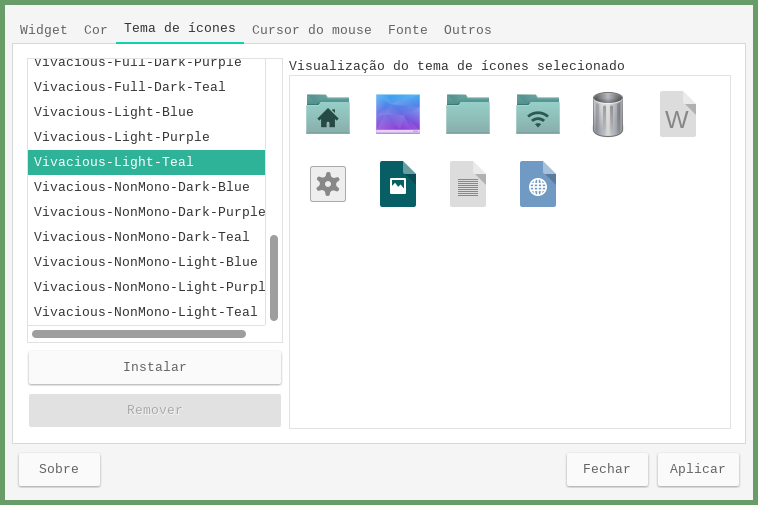
Baixe o pacote de ícones Vivacious em:
Descompacte e instale:
tar -xvf Vivacious-*tar.gz
# mv Vivacious-* /usr/share/icons/
Abra o lxapperance:
lxappearance
Deixe como nas imagens:

APLICATIVOS ÚTEIS
Recomendo instalar o volumeicon que controla o som e o volume:# slpkg -s sbo volumeicon
Também recomendo usar o xfce4-clipman para gerenciar a área de transferência. Mas esse já vem na instalação Full.
Para que iniciem juntos com o i3, coloque-os naquele bloco junto com o compton e o wal:
nano .config/i3/config
##################
#INICIADOS COM O I3
##################

#Compton
exec --no-startup-id compton -cCGfF -o 0.38 -O 200 -I 200 -t 0 -l 0 -r 3 -D2 -m 0.88

#Papel de parede
exec --no-startup-id wal -i ~/wall/Corporate_Sunrise.png
#exec --no-startup-id feh --bg-fill ~/wall/Corporate_Sunrise.png

#Aplicativos úteis
exec --no-startup-id xfce4-clipman
exec --no-startup-id volumeicon
CONFIGURANDO O I3LOCK PARA TRANCAR A TELA
Com o i3lock criaremos uma forma de travar a tela, deixado-a embaçada se passar 10 minutos de espera ou se você pressionar Mod+Super+L.Primeiro, crie o arquivo "/bin/lock":
# touch /bin/lock
Edite-o:
# nano /bin/lock
E coloque o seguinte conteúdo:
#!/bin/bash
scrot /tmp/screenshot.png
convert /tmp/screenshot.png -blur 0x5 /tmp/screenshotblur.png
i3lock -i /tmp/screenshotblur.png
Instale os pacotes necessários:
# slpkg -q xautolock i3lock --add
# slpkg -q install
Também é necessário o scrot e o imagemagick. Mas esses já vem na instalação Full da distribuição.
Torne o arquivo executável:
# chmod +x /bin/lock
Abra o arquivo de configuração do i3:
nano .config/i3/config
No final do arquivo, adicione:
# auto iniciar screenlock
exec xautolock -time 10 -locker lock

#atalho para screenlock
bindsym $mod+Control+l exec /bin/lock
Salve e feche.
Agora pode trancar sua área de trabalho com o comando Mod+Ctrl+L ou esperar 10 minutos.
Para destrancar: digite a sua senha de usuário e depois Enter.
CONCLUSÃO
E assim chegamos ao fim da configuração proposta pelo artigo. O i3 tem muitas possibilidade e você vai descobrir mais com o tempo. Pode usar alternativas ao i3status como o polybar ou i3blocks. Se quiser tirar screenshots da sua área de trabalho, pode usar o comando "import" e selecionar a área, ou o comando "scrot -d 5 -c" ou até mesmo o "xfce4-screenshooter".Espero que tenha gostado.
Abraço!
2. Pós instalação
3. Alterando o arquivo de configuração do i3
4. Esquema de Cores do Terminal e Papel de Parede
Tem Facebook? Então tem Joli OS
Tema com cores vivas para Xfce no Xubuntu 12.04
Migração de Arch Linux para repositórios CachyOS (Uso de Instruções v3 e v4)
Criptografando sua Home com Gocryptfs para tristeza do meliante
Instalação do Arch Linux com LVM + Luks
Embutindo legenda e fazendo autoração de um vídeo para DVD
Se isso é afrescalhar, então meu i3 é o da Barbie. :)
Uma verdadeira reconfiguração do i3, que já é minimalista, fazendo o par perfeito com o Slackware.
Ótimo artigo de personalização.
Eu ri com o título. Embora tenha gostado dos ícones. Mas pelo menos no repositório do AUR já tem mais de 2 anos em atualização.
________________
“Quem combate monstruosidades deve cuidar para que não se torne um monstro. E se você olhar longamente para um abismo, o abismo também olha para dentro de você”
Nietzsche.
Cara, seu Slackware com essa cara é tudo menos fresco (rsrs). Nunca experimentei esse minimalismo todo, mas talvez seu artigo me anime.
E como é difícil contentar user do Slackware...
No meu último artigo traduzi o Distrowatch dizendo que o Slackware era "fácil" e veio um reclamar, mas fez isso educadamente. Expliquei e o "reclamante" entendeu o ponto de vista, até porque era válido.
Todo ponto de vista pode mudar quando o ângulo de visão muda, não é mesmo?
[3] Comentário enviado por pinduvoz em 02/02/2019 - 17:08h
Cara, seu Slackware com essa cara é tudo menos fresco (rsrs). Nunca experimentei esse minimalismo todo, mas talvez seu artigo me anime.
E como é difícil contentar user do Slackware...
No meu último artigo traduzi o Distrowatch dizendo que o Slackware era "fácil" e veio um reclamar, mas fez isso educadamente. Expliquei e o "reclamante" entendeu o ponto de vista, até porque era válido.
Todo ponto de vista pode mudar quando o ângulo de visão muda, não é mesmo?
Só por diversão esse minimalismo... se quiser se inspirar olha o unixporn.
https://www.reddit.com/r/unixporn/
Mas quando fiz o artigo, não conhecia. Tem gente que leva a personalização muito a sério. kkkkkkkk
Sobre os slackers, pode ser verdade isso. Ou vai ver não depende da distro e sim da pessoa mesmo.
É saudável poder mudar de opinião, eu acho.
[1] Comentário enviado por izaias em 01/02/2019 - 14:22h
Se isso é afrescalhar, então meu i3 é o da Barbie. :)
Uma verdadeira reconfiguração do i3, que já é minimalista, fazendo o par perfeito com o Slackware.
Ótimo artigo de personalização.
Seu i3 é o mais enfeitado de todos =P
[2] Comentário enviado por edivandjs em 01/02/2019 - 19:35h
Eu ri com o título. Embora tenha gostado dos ícones. Mas pelo menos no repositório do AUR já tem mais de 2 anos em atualização.
________________
“Quem combate monstruosidades deve cuidar para que não se torne um monstro. E se você olhar longamente para um abismo, o abismo também olha para dentro de você”
Nietzsche.
kkkk a intenção era essa
O site que você passou tem umas screens bem legais. Valeu!
O titulo mais explicito dos últimos vinte anos , com certeza.
Ficou bacana. Achei interessante esse i3. Eu queria ver como ele ficaria com o KDE 5 no Slackware junto. Será que funciona?
Patrocínio

Destaques
Artigos
A produção de áudio e vídeo no Linux e as distribuições dedicadas a esse fim
Criptografando sua Home com Gocryptfs para tristeza do meliante
A Involução do Linux e as Lambanças Desnecessárias desde o seu Lançamento
O Journal no Linux para a guarda e consulta de logs do sistema
A evolução do Linux e as mudanças que se fazem necessárias desde o seu lançamento
Dicas
Cursor do mouse gigante no KDE Plasma
Integração do Flatpak e Flathub no Kubuntu (KDE Discover)
Habilitando suporte ao Flatpak e Flathub no Ubuntu
Tópicos
Top 10 do mês
-

Xerxes
1° lugar - 154.725 pts -

Fábio Berbert de Paula
2° lugar - 79.663 pts -

Alberto Federman Neto.
3° lugar - 44.918 pts -

Buckminster
4° lugar - 44.800 pts -

Alessandro de Oliveira Faria (A.K.A. CABELO)
5° lugar - 36.806 pts -

edps
6° lugar - 33.176 pts -

Sidnei Serra
7° lugar - 25.671 pts -

Mauricio Ferrari (LinuxProativo)
8° lugar - 25.547 pts -

Daniel Lara Souza
9° lugar - 23.554 pts -

Andre (pinduvoz)
10° lugar - 22.701 pts
Scripts

A maior comunidade GNU/Linux da América Latina! Artigos, dicas, tutoriais, fórum, scripts e muito mais. Ideal para quem busca auto-ajuda.
Site hospedado por:
