
Montando um Media Server com o MediaTomb
Esse artigo descreve os passos necessários para instalação do MediaTomb, um poderoso servidor de mídia baseado no protocolo UPnP.

Parte 2: Testando do MediaTomb
a. Execute o MediaTomb:
mediatomb
MediaTomb UPnP Server version 0.12.0 - http://mediatomb.cc/
=====================================================================
Copyright 2005-2008 Gena Batsyan, Sergey Bostandzhyan, Leonhard Wimmer.
MediaTomb is free software, covered by the GNU General Public License version 2
2010-02-04 14:36:08 INFO: MediaTomb configuration was created in:
/home/mediatomb/.mediatomb/config.xml
2010-02-04 14:36:08 INFO: Loading configuration from:
/home/mediatomb/.mediatomb/config.xml
2010-02-04 14:36:08 INFO: UUID generated: 39f7268a-f88f-418a-80d7-
99c4233e9dd7
2010-02-04 14:36:08 INFO: Checking configuration...
2010-02-04 14:36:08 INFO: Setting filesystem import charset to UTF-8
2010-02-04 14:36:08 INFO: Setting metadata import charset to UTF-8
2010-02-04 14:36:08 INFO: Setting playlist charset to UTF-8
2010-02-04 14:36:08 WARNING: You enabled the YouTube feature, which allows
You to watch YouTube videos on your UPnP device!
Please check http://www.youtube.com/t/terms
By using this feature you may be violating
YouTube service terms and conditions!
2010-02-04 14:36:08 INFO: Configuration check succeeded.
2010-02-04 14:36:09 WARNING: Sqlite3 database seems to be corrupt or doesn't
exist yet.
2010-02-04 14:36:09 INFO: no sqlite3 backup is available or backup is
corrupt. automatically creating database...
2010-02-04 14:36:09 INFO: database created successfully.
2010-02-04 14:36:09 INFO: Initialized port: 49152
2010-02-04 14:36:09 INFO: Server bound to: 192.168.1.100
2010-02-04 14:36:10 INFO: MediaTomb Web UI can be reached by following
this link:
2010-02-04 14:36:10 INFO: http://192.168.1.100:49152/
b. Com o MediaTomb sendo executado, acesse a interface WEB através de algum navegador (http:// 192.168.1.100:49152):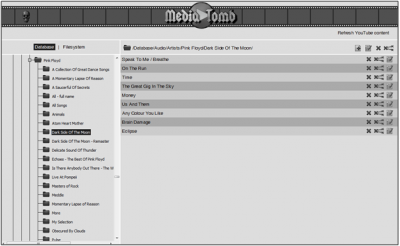 c. Verifique no PS3 se o mesmo pode ser encontrado em Music, Video e Photo:

mediatomb
MediaTomb UPnP Server version 0.12.0 - http://mediatomb.cc/
=====================================================================
Copyright 2005-2008 Gena Batsyan, Sergey Bostandzhyan, Leonhard Wimmer.
MediaTomb is free software, covered by the GNU General Public License version 2
2010-02-04 14:36:08 INFO: MediaTomb configuration was created in:
/home/mediatomb/.mediatomb/config.xml
2010-02-04 14:36:08 INFO: Loading configuration from:
/home/mediatomb/.mediatomb/config.xml
2010-02-04 14:36:08 INFO: UUID generated: 39f7268a-f88f-418a-80d7-
99c4233e9dd7
2010-02-04 14:36:08 INFO: Checking configuration...
2010-02-04 14:36:08 INFO: Setting filesystem import charset to UTF-8
2010-02-04 14:36:08 INFO: Setting metadata import charset to UTF-8
2010-02-04 14:36:08 INFO: Setting playlist charset to UTF-8
2010-02-04 14:36:08 WARNING: You enabled the YouTube feature, which allows
You to watch YouTube videos on your UPnP device!
Please check http://www.youtube.com/t/terms
By using this feature you may be violating
YouTube service terms and conditions!
2010-02-04 14:36:08 INFO: Configuration check succeeded.
2010-02-04 14:36:09 WARNING: Sqlite3 database seems to be corrupt or doesn't
exist yet.
2010-02-04 14:36:09 INFO: no sqlite3 backup is available or backup is
corrupt. automatically creating database...
2010-02-04 14:36:09 INFO: database created successfully.
2010-02-04 14:36:09 INFO: Initialized port: 49152
2010-02-04 14:36:09 INFO: Server bound to: 192.168.1.100
2010-02-04 14:36:10 INFO: MediaTomb Web UI can be reached by following
this link:
2010-02-04 14:36:10 INFO: http://192.168.1.100:49152/
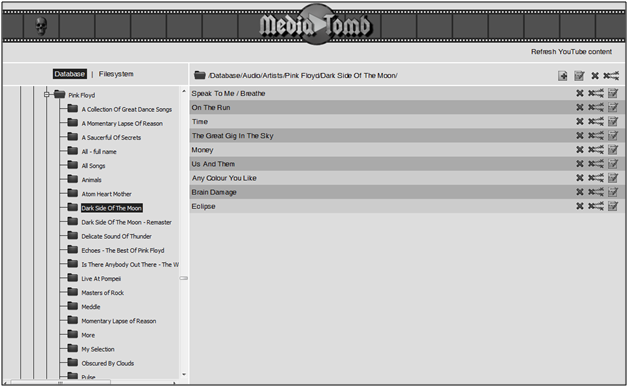
b. Com o MediaTomb sendo executado, acesse a interface WEB através de algum navegador (http:// 192.168.1.100:49152):

Mas o artigo perde-se em configurações que deviam estar em anexos, para se poder ler melhor o artigo, e fiquei sem perceber para que é que serve , e quem lê .
Estava aqui a ver, na internet, que se pode instalar o mediathumb em discos multimédia como emetec R100, que deve ser bastante interessante (eu tenho um) mas não percebo qual a sua função e para que serve a PS3?
De qualquer modo , agradeço imenso a sua contribuição, e não desanime com as criticas :)